
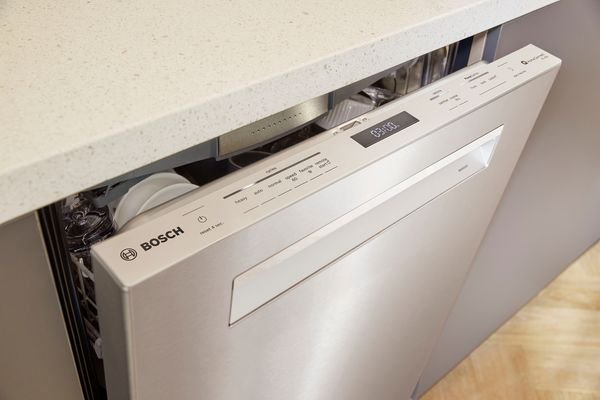
Have you ever found yourself standing in front of your Bosch dishwasher, staring at its control panel, and wondering why it’s not working as it should? You’re not alone.
Many Bosch dishwasher owners have faced this puzzling scenario. Your once-reliable kitchen companion suddenly refuses to cooperate, leaving you with a pile of dirty dishes and a growing sense of frustration. But don’t worry; there’s a simple solution that could bring your dishwasher back to life and save you from a costly service call.
Imagine being able to reset your Bosch dishwasher in just a few easy steps, restoring its functionality and bringing peace back to your kitchen. This article is your guide to doing just that. We’ll walk you through the process of resetting your Bosch dishwasher, ensuring you have the confidence and know-how to tackle this common issue. Ready to reclaim your kitchen and restore harmony to your dishwashing routine? Let’s dive in and get your Bosch dishwasher back on track.

Credit: www.youtube.com
Identifying Dishwasher Model
Resetting a Bosch dishwasher involves pressing the Start button for 3-5 seconds until the reset begins. Locate the model number first, usually on the door’s edge or the appliance’s side. This number ensures accurate instructions for resetting and troubleshooting.
To reset your Bosch dishwasher, you first need to identify the model. This step is crucial because different models may have distinct reset procedures. Knowing your model can save you time and frustration, ensuring you follow the correct steps. Finding the model number is easier than you might think.Locate The Model Number
Start by opening the dishwasher door. You’ll often find the model number on a label located on the side of the door or the door frame. If you’re having trouble, try using a flashlight to make it easier to read. Sometimes, the model number is inside the dishwasher, near the top edge. Once you’ve found it, jot it down for future reference.Understand Model Variations
Bosch dishwashers come in various models with different features and specifications. Some models might have a reset button, while others require a sequence of buttons to be pressed. Knowing your specific model helps you follow the right instructions. For instance, a Bosch 800 series might reset differently than a Bosch Ascenta. This knowledge can empower you to fix issues quickly. Have you ever tried to reset an appliance and wondered if you were following the right steps? Identifying your dishwasher model eliminates this uncertainty. Armed with the model number, you can easily find the correct manual online, which often includes troubleshooting tips tailored to your model. Taking the time to understand your dishwasher model can prevent unnecessary frustration and ensure you’re on the right track to resolving issues.
Credit: www.wikihow.com
Common Reset Scenarios
Sometimes, your Bosch dishwasher might need a reset. This can happen for several reasons. Understanding these scenarios helps fix minor issues easily. Here are some common reset situations you might encounter.
Error Codes And Malfunctions
Error codes can appear unexpectedly. These codes indicate specific problems with the dishwasher. A reset often clears these error messages. It helps the system start fresh. Malfunctions, like buttons not responding, might also require a reset. Performing a reset ensures the dishwasher operates smoothly again.
Interrupted Wash Cycles
A wash cycle might stop unexpectedly. This can happen due to power outages or accidental door openings. A simple reset can restore the cycle. It allows the dishwasher to resume washing. This ensures your dishes get cleaned properly. Always check the manual for specific reset instructions.
Basic Reset Steps
Resetting a Bosch dishwasher involves a few simple steps. First, press and hold the “Start” button until the display clears. Next, close the door to allow the dishwasher to reset and restart its cycle. This process helps fix common issues without professional assistance.
Resetting your Bosch dishwasher might seem daunting, but it’s often simpler than you think. Whether your dishwasher is acting up or you simply want to start fresh, knowing the basic reset steps can save you time and frustration. Let’s dive into the essentials of giving your Bosch dishwasher the reset it needs.Power Cycle The Dishwasher
One of the easiest ways to reset your Bosch dishwasher is to power cycle it. Start by unplugging the dishwasher from the electrical outlet. If it’s hardwired, switch off the circuit breaker. Wait for about 5 minutes. This allows the system to clear any glitches. Plug it back in or switch the circuit breaker on. Doesn’t it feel satisfying when a simple unplug solves the problem? Sometimes all your dishwasher needs is a fresh start!Manual Reset Button
Did you know your Bosch dishwasher might have a manual reset button? Check the control panel. Look for a button labeled ‘Reset’ or ‘Cancel Drain’. Press and hold it for a few seconds. This action can reset the machine’s settings. Isn’t it reassuring to know you have control right at your fingertips? Next time your dishwasher misbehaves, this button might be your best friend. Resetting your Bosch dishwasher doesn’t have to be complicated. Try these basic steps and see if they resolve your issue. What’s your experience with troubleshooting appliances?
Credit: www.youtube.com
Resetting Newer Models
Resetting a Bosch dishwasher can resolve common errors or glitches. Newer Bosch models feature advanced technology and user-friendly control panels. This makes resetting straightforward. Follow these steps to reset your dishwasher effectively.
Using The Control Panel
Locate the control panel on your Bosch dishwasher. It is usually on the top edge of the door. Open the door to access it. Press the “Start” button for about three seconds. This action cancels the current cycle. Wait for the display to show a confirmation. Your dishwasher is now reset.
If your dishwasher has a digital display, look for a reset option. This option may be marked as “Cancel” or “Reset.” Use this feature to restart your dishwasher.
Advanced Settings Reset
Some newer Bosch models have advanced reset settings. These settings are accessible through the control panel. Check your user manual for instructions specific to your model. Locate the “Settings” button on the panel. Press and hold it for a few seconds. This action resets the internal settings.
If issues persist, consider resetting the power. Unplug the dishwasher for a few minutes. Reconnect it to reset the system completely. This step can resolve more complex errors.
Resetting Older Models
Resetting older Bosch dishwasher models can sometimes be a bit challenging. These models might require a different approach compared to newer versions. Understanding the process is essential for troubleshooting and maintaining your appliance. Whether you have a model with button combinations or a mechanical reset method, knowing the steps can save time and effort.
Button Combinations
Some older Bosch dishwashers use button combinations to reset. These combinations vary by model. Commonly, holding down the start button for a few seconds works. Another method involves pressing the cancel button twice. It’s important to check your specific model’s manual. It can provide the exact button sequence.
Mechanical Reset Methods
Mechanical reset methods might involve unplugging the dishwasher. This can help reset the system manually. Wait for a few minutes after unplugging. Then, plug it back in. This allows the machine to reboot. Another option is flipping the circuit breaker. Turn it off for about 10 seconds, then back on. This might help reset the machine’s electrical components.
Troubleshooting Persistent Issues
Resetting a Bosch dishwasher can be essential to solve persistent issues. Sometimes, simple steps can resolve the problem. Before calling a technician, try these solutions. A reset might be all it takes to get back on track.
Check Power Supply
The power supply is a common cause of dishwasher problems. Ensure the appliance is plugged in securely. Check the circuit breaker. It might have tripped. Turn it back on if needed. A faulty outlet could also be the issue. Try plugging another device to test it. If it doesn’t work, the outlet might be faulty.
Inspect Water Supply
Water supply issues can disrupt dishwasher function. Ensure the water valve is open. It should allow water to flow. Check hoses for kinks or blockages. A bent hose can restrict water. Clean the filter if it’s clogged. This can improve water flow. Sometimes, low water pressure affects performance. Consult a plumber if needed.
When To Call A Professional
Experiencing persistent issues with your Bosch dishwasher may require professional help. Reset attempts failing, or recurring error codes signal the need for expert intervention. Protecting your appliance’s longevity is crucial, so don’t hesitate to seek assistance when troubles persist.
When your Bosch dishwasher acts up, a reset might not work. You may wonder if it’s time to call a professional. Some problems need expert attention. This section helps you decide when to seek help.Recognizing Complex Issues
Some issues are beyond a simple reset. If your dishwasher leaks, it could signal a bigger problem. Strange noises might mean parts are worn out. Error codes that keep appearing suggest a deeper issue. These complex problems require professional diagnosis.Warranty And Service Options
Check your dishwasher’s warranty. It might cover the repair cost. Using authorized service centers can keep your warranty valid. Professionals have access to Bosch parts and expertise. They ensure your dishwasher gets the best care.Frequently Asked Questions
How Do You Do A Hard Reset On A Bosch Dishwasher?
To hard reset a Bosch dishwasher, turn off the power by unplugging it or flipping the circuit breaker. Wait for five minutes, then restore power. This resets the control panel and can resolve many issues. Ensure the door is closed securely after resetting.
Where Is The Bosch Reset Button?
The Bosch reset button is usually located on the control panel. It’s often marked with “Reset” or a specific symbol. Check the user manual for exact location details, as it can vary by model. If unsure, consult Bosch’s customer support or their official website for guidance.
How Do I Reset The Error On My Bosch Dishwasher?
To reset a Bosch dishwasher error, press and hold the “Start” button for 3 to 5 seconds. This should clear the error code. If the issue persists, check the manual for specific error code instructions. Ensure the door is closed properly before resetting.
How Do You Force A Dishwasher To Reset?
Press and hold the start button for 3-5 seconds to reset most dishwashers. Consult the manual for specific instructions if needed. Make sure the dishwasher is turned off before attempting a reset.
Conclusion
Resetting your Bosch dishwasher is straightforward. Follow the steps carefully. Ensure safety by unplugging the appliance first. Consult the user manual for specific instructions. Most models have a reset button. Press it to start the process. Wait for the dishwasher to reboot.
Check if the issue is resolved. Regular maintenance prevents frequent resets. Keep filters clean and check for blockages. A well-maintained dishwasher lasts longer. Enjoy hassle-free dishwashing with a Bosch appliance. Share these tips with friends if they face similar issues.
Happy dishwashing!
