
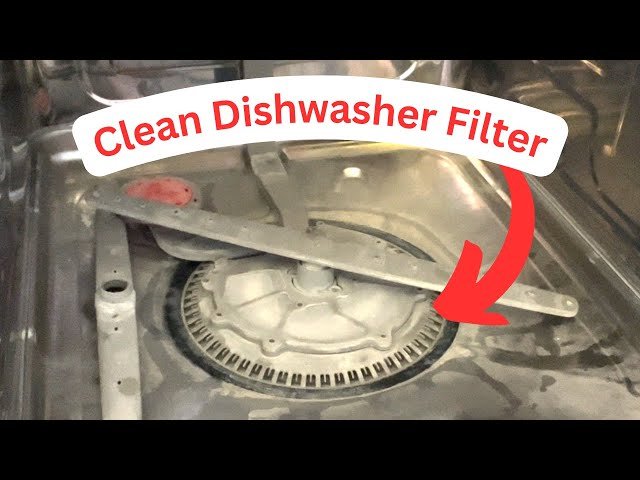
Imagine this: You’ve just finished a delightful meal, and your trusty Samsung dishwasher has done its magic, leaving your dishes sparkling clean. But wait—have you ever thought about the filter inside your dishwasher?
Over time, it collects food particles, grease, and grime, which can affect the dishwasher’s efficiency and even lead to unpleasant odors. You might be wondering how to keep your Samsung dishwasher performing at its best. The answer lies in regular filter maintenance.
Don’t worry; cleaning the filter is simpler than you might think, and dedicating a few minutes to this task can ensure your dishes remain spotless and your machine runs smoothly. Curious to learn the step-by-step process? Discover how you can easily clean the filter in your Samsung dishwasher and keep it functioning like new. Read on, and you’ll be equipped with the knowledge to maintain your dishwasher effortlessly. Your future self—and your dishes—will thank you!
Tools And Materials Needed
Gather a soft brush, a towel, and mild detergent for cleaning. Ensure the dishwasher is unplugged before starting. These tools make the process smooth and safe.
Cleaning the filter in your Samsung dishwasher might seem like a daunting task, but with the right tools and materials, it becomes a simple and straightforward process. You don’t need a toolbox full of gadgets or any special training. Just a few basic items will do the job efficiently, saving you time and effort. Let’s dive into what you need to get started.1. Basic Tools You Already Have
You don’t need to go out and buy fancy equipment. A soft brush, like an old toothbrush, is perfect for scrubbing away grime. A microfiber cloth is great for wiping down surfaces without leaving scratches. Most of these items are likely already in your cleaning arsenal, making this task even more accessible.2. Cleaning Agents
A mild dish soap is your best friend here. It’s gentle on your dishwasher parts but tough on dirt and grease. You might also consider white vinegar for a more natural cleaning option. Both these agents are effective and safe, ensuring your filter is spotless without any chemical residues.3. Protective Gear
While this isn’t a heavy-duty cleaning task, a pair of rubber gloves can protect your hands from hot water and soap. Plus, they give you a better grip on the filter, making it easier to clean thoroughly. It’s a small step that adds comfort to the process.4. Container For Soaking
A small bowl or bucket will be useful for soaking the filter. Soaking helps loosen stubborn debris, making it easier to scrub away. This simple step can drastically reduce cleaning time and improve effectiveness.5. Old Towel Or Mat
Placing an old towel or mat under the dishwasher filter area can catch any drips or spills. This keeps your kitchen floor clean and slip-free. It’s a practical tip that saves you from additional cleanup later on. Think about how much easier life could be if you could avoid dishwasher clogs by just cleaning the filter regularly. With the right tools and materials, you can keep your dishwasher running smoothly without any hassle. So, next time you’re planning your cleaning routine, make sure you have these essentials on hand. What’s stopping you from giving it a try today?Locating The Dishwasher Filter
Find the dishwasher filter by opening the bottom rack and locating it near the spray arms. Remove the filter and rinse it under warm water to clean debris and ensure efficient performance in your Samsung dishwasher. Regular cleaning helps maintain optimal washing results.
Locating the dishwasher filter in your Samsung dishwasher can feel like a small puzzle, especially if you’ve never cleaned it before. However, once you find it, you’ll see how easy it is to maintain, ensuring your dishwasher runs smoothly. Let’s dive into finding this crucial component so you can keep your kitchen appliance in top shape.Understanding The Filter’s Importance
The filter in your dishwasher plays a key role in catching food particles and debris. Cleaning it regularly prevents clogs and keeps your dishwasher performing optimally. A clean filter can even improve the cleanliness of your dishes.Opening The Dishwasher Door
Begin by opening the dishwasher door completely. This gives you full access to the interior, making it easier to reach the filter. Ensure your dishwasher is off and empty to avoid any accidents.Removing The Bottom Rack
Next, slide out the bottom rack and set it aside. This step is crucial as it gives you clear access to the dishwasher’s base. You’ll often find the filter located here, nestled around the spray arm.Spotting The Filter
Look for a circular or cylindrical component, usually near the spray arm. It’s typically a mesh or grille-like structure. If you’ve ever wondered what that odd-looking piece was, you’ve just found your filter.Checking Your User Manual
If you’re unsure about the exact location or appearance of the filter, consult your user manual. It contains diagrams that can guide you right to it. Don’t have the manual handy? Samsung’s website often has downloadable versions.Listening To Your Dishwasher
Ever notice your dishwasher making unusual noises? A clogged filter might be the culprit. If you hear strange sounds, it might be a sign that your filter needs cleaning. Locating the filter might seem like a minor task, but once you get into the habit, you’ll find it can save you both time and money. Have you ever encountered a unique challenge while finding your dishwasher filter? Share your experiences in the comments!Removing The Filter
Keeping your Samsung dishwasher in top condition requires regular maintenance. One crucial step is cleaning the filter. It traps food particles and debris, ensuring spotless dishes. Neglecting this can lead to poor performance and unclean dishes. Below, you will find a simple guide on removing the filter from your Samsung dishwasher.
Step 1: Power Off The Dishwasher
Before removing the filter, ensure the dishwasher is off. This prevents any accidental starts. Unplugging the appliance adds an extra layer of safety.
Step 2: Locate The Filter
Open the dishwasher door to access the interior. The filter is typically at the bottom, beneath the lower rack. Slide the lower rack out gently to reach the filter.
Step 3: Remove The Filter Assembly
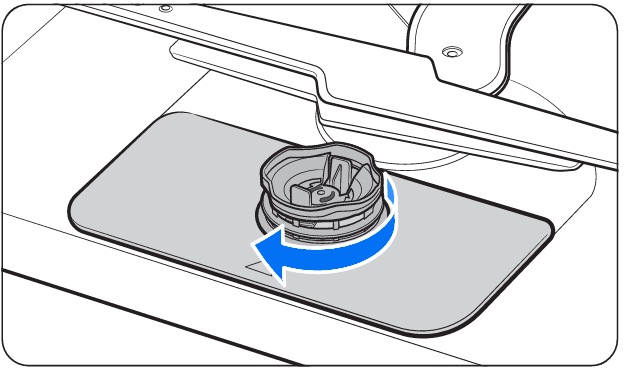
The filter is usually a cylindrical part. Turn it counterclockwise to unlock it. Carefully lift it out without forcing. If it feels stuck, double-check for any remaining locks.
Step 4: Inspect And Clean
Once removed, inspect the filter for debris. Rinse it under warm water to remove particles. Use a soft brush for stubborn dirt. Ensure the filter is completely clean before reinserting.
Step 5: Reinsert The Filter
Place the filter back into its slot. Turn it clockwise to secure it. Ensure it fits snugly to prevent leaks. Close the door and plug the dishwasher back in. Your dishwasher is now ready for use.

Credit: www.youtube.com
Cleaning The Filter
Maintaining your Samsung dishwasher involves cleaning the filter regularly. Remove the lower rack to access the filter. Gently twist and pull out the filter, rinse under warm water to remove debris, and replace it securely. This ensures optimal performance and cleanliness.
Cleaning the filter in your Samsung dishwasher might not be the highlight of your day, but trust me, it’s a rewarding task. This small yet crucial step ensures your dishwasher runs efficiently, saving you time and hassle in the long run. Plus, there’s something satisfying about knowing your dishes are getting the best clean possible.Rinsing Under Water
Start by removing the filter from your dishwasher. Most Samsung models make this easy with a simple twist and pull. Once out, hold the filter under warm running water. Rinse thoroughly to remove food particles and debris. These tiny bits can clog your filter and reduce cleaning performance. Remember, even if the filter looks clean, those small particles might still be lurking. Do you notice any stubborn spots or gunk? A gentle scrub with a soft brush should do the trick.Using Cleaning Solutions
You don’t need fancy products to clean your dishwasher filter—simple solutions work wonders. A mix of dish soap and warm water is often enough. Soak the filter for a few minutes if you spot greasy residues. This makes it easier to wash away the grime. If you’re dealing with tough stains, consider a vinegar solution. Mix equal parts vinegar and water, and let the filter sit for about 10 minutes. This not only cleans but also deodorizes the filter. Have you ever noticed an unpleasant smell coming from your dishwasher? Regularly cleaning with vinegar can help prevent this. It’s a simple yet effective way to maintain a fresh-smelling kitchen. Once you’re done, rinse the filter under clean water again before placing it back. Your dishwasher is now ready to tackle the next load with ease. How often do you clean your dishwasher filter? Regular maintenance can keep your appliance running smoothly, ensuring clean dishes every time.Reassembling The Filter
Discovering how to clean the filter in a Samsung dishwasher can keep it working efficiently. Remove the filter, rinse under warm water, and gently scrub away debris. Ensure to reassemble properly, securing each piece firmly for optimal performance.
Reassembling the filter in your Samsung dishwasher might seem like a daunting task at first glance, but with a little guidance, it’s a breeze. Imagine the satisfaction of knowing that your dishwasher is running at peak efficiency, simply because you took the time to understand the basics. Once you’ve cleaned the filter, putting it back together correctly is crucial for optimal performance.Step-by-step Guide To Reassemble The Filter
Begin by ensuring all parts of the filter are completely dry. This prevents any moisture-related issues when reassembling. Place the largest filter piece first, ensuring it fits snugly into its designated spot. This acts as the base for the other components. Next, take the cylindrical filter piece and align it with the base filter. It should slide easily into place. If it doesn’t, reposition it until it fits securely.Securing The Components
Once the cylindrical filter is in place, you’ll need to add the smaller mesh filter. This piece is crucial as it catches finer particles. Make sure it locks into the cylindrical filter without any gaps. Double-check that all filters are firmly seated. A loose filter can lead to poor washing performance and even damage.Testing Your Work
Before closing the dishwasher, give the filter a gentle tug. Does it feel secure? If it’s wobbly, you may need to recheck the alignment. Run a short cycle to test the reassembled filter. This ensures everything is functioning as expected.Final Thoughts
Cleaning and reassembling your dishwasher filter might not be the most exciting chore, but consider the benefits. A well-maintained filter means cleaner dishes and a longer-lasting appliance. Doesn’t it feel great to take charge of your home maintenance? Next time, you’ll approach this task with confidence, knowing you’re saving time and money in the long run.Maintenance Tips
Cleaning the filter in a Samsung dishwasher improves performance and prevents clogs. Start by removing the lower rack. Twist the filter counterclockwise to detach it, then rinse under warm water. Use a soft brush for stubborn debris. Reassemble the filter, ensuring it’s secure before running the dishwasher again.
Regular maintenance keeps your dishwasher efficient.
Cleaning the filter in your Samsung dishwasher is crucial. It ensures optimal performance and extends the life of your appliance. Regular maintenance keeps your dishwasher running smoothly. It also prevents unpleasant odors and unsatisfactory cleaning results. Let’s dive into some maintenance tips that will keep your dishwasher in top shape.Regular Cleaning Schedule
Establish a cleaning schedule for your dishwasher filter. Clean the filter at least once a month. This prevents food particles and debris from clogging it. A clean filter ensures efficient water flow. It also improves the dishwasher’s cleaning power. Mark your calendar. Set a monthly reminder to check and clean the filter. Consistency is key.Signs Of A Dirty Filter
A dirty filter affects your dishwasher’s performance. Notice any signs? Your dishes might not be getting clean. You may see food particles left on dishes. This is a clear indicator. Is there a bad smell when you open the dishwasher? This is another sign. Water drainage issues can also occur. If water remains at the bottom, check the filter. These are signs that it needs cleaning. By following these maintenance tips, you can ensure your Samsung dishwasher runs efficiently. Regular care makes a big difference.Troubleshooting Common Issues
Cleaning the filter in a Samsung dishwasher prevents clogs and ensures efficient performance. Remove the bottom rack and unscrew the filter. Rinse it under warm water to remove food particles.
Cleaning the filter in your Samsung dishwasher is crucial for maintaining its efficiency and preventing potential issues. Sometimes, even after cleaning the filter, you might encounter common problems that can be frustrating. Let’s explore how to troubleshoot these issues effectively.Persistent Odors
If your dishwasher emits unpleasant smells despite having a clean filter, the issue might lie elsewhere. Food particles trapped in the spray arms or in the dishwasher’s corners can cause odors. To tackle this, ensure you clean all parts of the dishwasher thoroughly. Remove the spray arms and rinse them under running water to eliminate any debris. Check if the drain area is clear and wipe the interior with a damp cloth and a mild detergent. Consider running an empty cycle with a cup of white vinegar on the top rack. This natural cleaner helps neutralize lingering smells and leaves your dishwasher smelling fresh. Have you ever thought about using baking soda for the same purpose? Sprinkle a cup at the bottom before running a short cycle for added freshness.Ineffective Cleaning Results
A clean filter should ideally result in sparkling dishes. But if your dishes still appear dirty or cloudy, there’s likely another culprit. Incorrect loading or detergent issues might be affecting performance. Ensure that dishes are not overcrowded, allowing water and detergent to circulate effectively. Check that the spray arms can move freely. If not, rearrange the dishes to allow proper flow. Are you using the right detergent? Sometimes, using too much or too little can impact results. Try adjusting the amount or switching to a different brand recommended for Samsung dishwashers. Running a cleaning cycle with a dishwasher cleaner can also help remove any build-up affecting cleaning performance. Regular maintenance and a little troubleshooting can make a world of difference in your dishwasher’s performance. What’s your experience been like? Have these tips made a noticeable improvement in your appliance’s efficiency?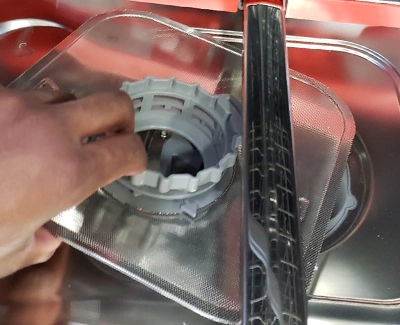
Credit: www.prwe.com
Credit: www.samsung.com
Frequently Asked Questions
Where Is The Filter In My Samsung Dishwasher?
The filter in your Samsung dishwasher is located at the bottom of the tub, near the spray arms. It is easily accessible for cleaning and maintenance. Make sure to check it regularly to ensure optimal performance and prevent clogs.
How Do I Know If My Dishwasher Has A Removable Filter?
Check your dishwasher’s manual for filter details. Look inside the dishwasher for a cylindrical or flat filter at the bottom. Most modern dishwashers have removable filters.
How To Pull Out A Samsung Washer Filter?
Locate the filter at the bottom front of the washer. Open the access panel using a flat screwdriver. Turn the filter counterclockwise to remove it. Clean it thoroughly before reinstalling. Ensure it is securely in place to prevent leaks. Regular cleaning maintains washer efficiency and extends its lifespan.
How Do I Find The Filter On My Dishwasher To Clean It?
Check the dishwasher’s manual or look inside the bottom rack. The filter is usually at the bottom center. Rotate it counterclockwise to remove and clean it.
Conclusion
Keeping your Samsung dishwasher filter clean ensures it runs smoothly. Regular maintenance prevents clogs and enhances cleaning performance. Follow the steps mentioned to clean your filter effectively. This task is simple and requires minimal effort. Schedule filter cleaning every month for optimal results.
Notice fewer water spots and better sanitation. A clean filter means a happier dishwasher. Don’t forget to check for any debris or buildup. Your dishes will thank you for the extra shine and cleanliness. Enjoy the benefits of a well-maintained dishwasher.
Make clean filters a part of your routine.
