
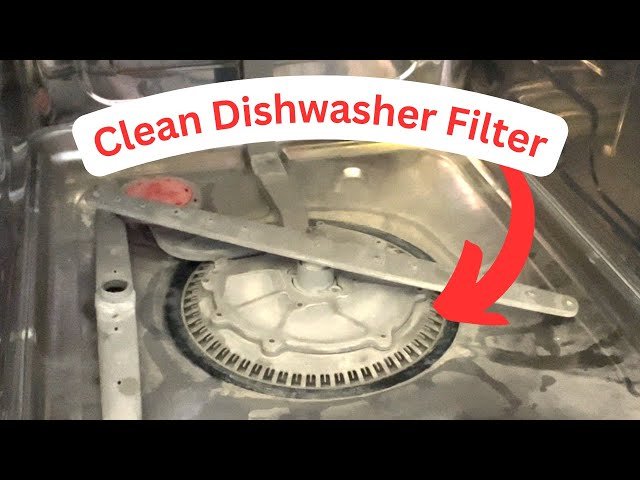
Have you noticed that your Samsung dishwasher isn’t performing as well as it used to? Perhaps it’s leaving behind food particles or just not getting your dishes as sparkling clean as before.
You might not realize it, but the solution could be as simple as cleaning the dishwasher’s filter. Yes, a dirty filter can drastically reduce the efficiency of your dishwasher, causing your once trusty appliance to underperform. In this guide, you’ll discover the straightforward steps to properly clean the filter on your Samsung dishwasher.
Not only will this restore its cleaning power, but it will also extend the life of your machine, saving you from unnecessary repairs or replacements. Imagine the satisfaction of having spotless dishes with every wash, not to mention the peace of mind that comes from knowing your appliance is running optimally. Stick with us, and you’ll soon master this essential maintenance task, ensuring your dishwasher works like a charm every time.
Gather Necessary Supplies
Begin by collecting essential items like a soft brush, microfiber cloth, and mild detergent. These supplies help in effectively cleaning the Samsung dishwasher filter without causing damage. Ensure you have them ready for a smooth and efficient cleaning process.
Cleaning the filter of your Samsung dishwasher is vital for maintaining its efficiency and preventing unpleasant odors. But before you dive into this task, it’s essential to gather all necessary supplies to make the process seamless and stress-free. Having everything ready ensures you don’t pause midway, making the job quicker and smoother. Plus, you avoid those frustrating moments of searching for missing items. Let’s make sure you’re well-prepared to tackle this cleaning chore with ease.Checklist For Supplies
Start with a simple checklist. It’s a straightforward way to ensure you have everything you need. Grab a pen and paper, or use your phone’s notes app to jot down the items. This list will be your go-to reference, saving you time and keeping you organized.Basic Cleaning Tools
You’ll need a few basic cleaning tools. A soft brush or toothbrush works wonders for scrubbing stubborn dirt. Microfiber cloths are perfect for wiping down surfaces without scratching them. Keep these tools handy for efficient cleaning.Cleaning Solutions
Choose a mild detergent or vinegar solution. Both are effective at breaking down grease and grime. Avoid harsh chemicals to prevent damage to your dishwasher. A simple mixture of vinegar and water can do the trick and is environmentally friendly.Protective Gear
Consider wearing gloves. Dishwashing can sometimes lead to contact with sharp debris or cleaning agents that might irritate your skin. Gloves protect your hands while providing a better grip on cleaning tools.Lighting And Visibility
Good lighting is crucial. Make sure your workspace is well-lit to see all areas of the filter. A portable lamp or flashlight can be a great asset if your kitchen lighting is dim.Waste Disposal
Prepare a waste bin or bag nearby. As you clean the filter, you might find bits of food or debris. Having a disposal method ready keeps your workspace tidy and avoids spreading mess around. Are you missing any of these essential supplies? Preparing in advance not only streamlines the cleaning process but also enhances your efficiency and satisfaction. You’ll be amazed at how a little preparation can transform a mundane chore into a rewarding accomplishment.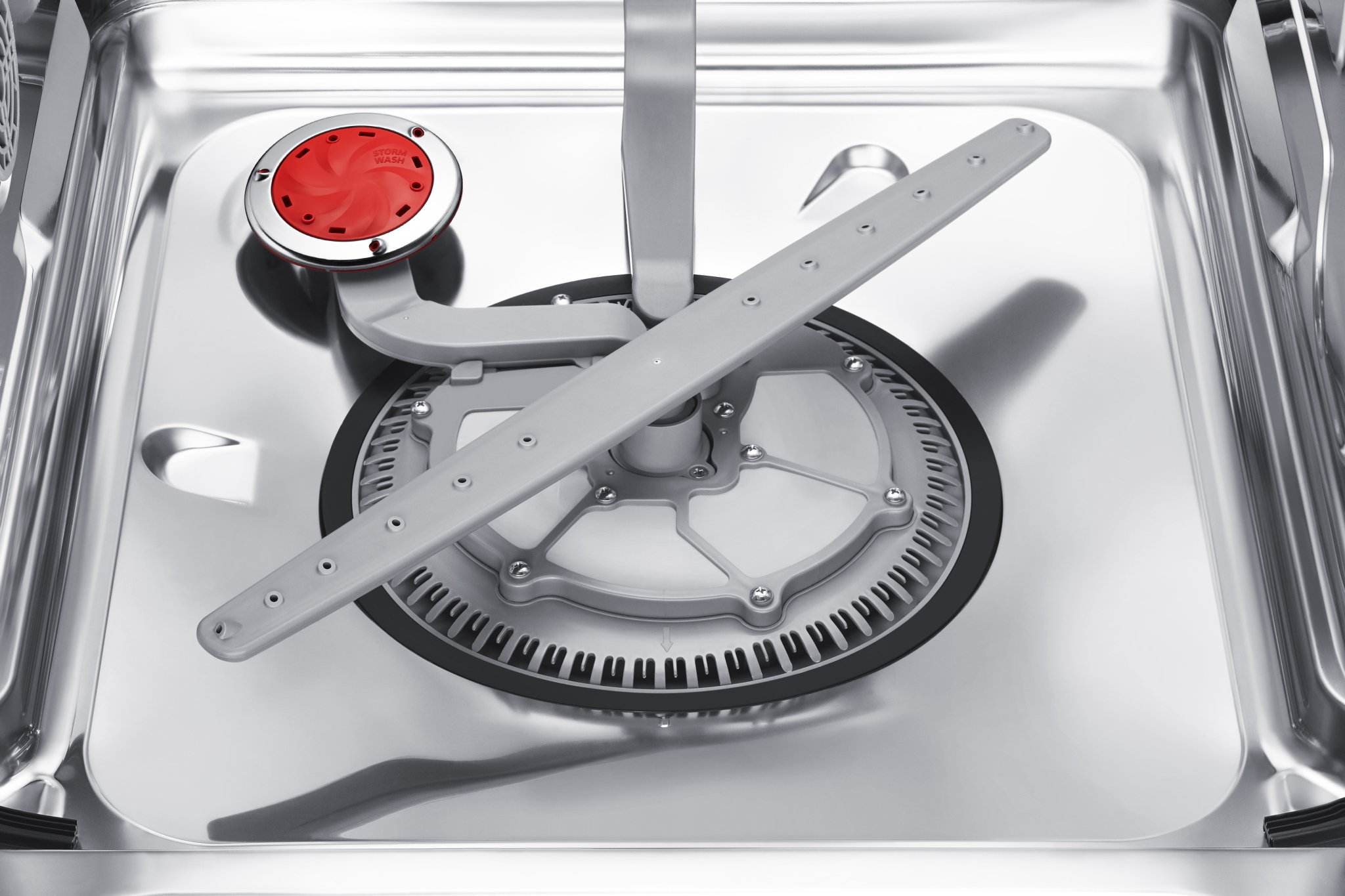
Credit: www.prwe.com
Locate The Filter
Locating the filter in your Samsung dishwasher is crucial for maintenance. A clean filter ensures your dishes come out sparkling every time. If you notice your dishwasher isn’t cleaning efficiently, the filter may need attention. Follow these steps to locate the filter quickly.
Identify The Dishwasher Model
Different Samsung models have unique filter placements. Check the user manual for specific instructions. Knowing your model number helps in locating the filter easily.
Open The Dishwasher Door
Start by opening the dishwasher door fully. This provides access to the bottom rack and filter area. Ensure the dishwasher is off and cool for safety.
Remove The Bottom Rack
Slide out the bottom rack to access the filter. This gives you a clear view of the dishwasher’s interior. Pull it out gently to avoid damaging the rack.
Locate The Filter Assembly
Look for the filter at the bottom of the dishwasher tub. It’s usually a round or oval piece. The filter assembly is often located near the spray arm.
Check For Securing Mechanisms
Some filters have a locking mechanism. Turn the filter counterclockwise to unlock it. Make sure you follow the manual for specific instructions.
Remove The Filter
Gently lift the filter out of its place. Handle it carefully to avoid breaking it. Removing it allows you to clean it thoroughly.
Remove The Lower Rack
To access the filter on a Samsung dishwasher, simply remove the lower rack. This step is essential for cleaning and maintenance. Ensure the area is clear and easy to reach for effective cleaning.
Cleaning the filter on your Samsung dishwasher might seem like a daunting task, but it’s quite simple once you get the hang of it. A crucial step in this process is removing the lower rack. This is the first physical barrier between you and that filter that needs a good cleaning. Removing the rack opens up the space and gives you the access you need. Have you ever wondered why your dishes aren’t as clean as you’d like? It might be time to check that filter.Step 1: Clear The Lower Rack
Before you remove the lower rack, make sure it’s free of any dishes or utensils. This might sound obvious, but you’d be surprised how easy it is to overlook a stray fork. Removing all items will prevent any accidental breakage or scratches.Step 2: Slide The Rack Out
Gently pull out the lower rack towards you. Most Samsung dishwashers have wheels on the lower rack, making this part easy. If you’ve ever felt like you’re wrestling with your dishwasher, it might be because the rack isn’t aligned properly. Make sure it’s on its tracks for a smooth glide.Step 3: Set The Rack Aside
After sliding it out, carefully lift the rack and place it on a stable surface nearby. You don’t want it to be a tripping hazard while you clean. Plus, having it out of the way allows you to move freely and focus on the task at hand. This simple act can make a world of difference in your cleaning routine.Step 4: Check For Debris
Once the rack is out, take a moment to check for any debris or food particles that might have fallen underneath. This can be a sneaky spot for residue to hide, affecting the efficiency of your dishwasher. Keeping this area clean ensures that you’re not inadvertently transferring dirt back onto your dishes.Step 5: Access The Filter
With the lower rack removed, you should have a clear view of the filter. It’s typically located at the bottom center of the dishwasher. Your mission, should you choose to accept it, is to give this filter the attention it deserves. A clean filter is your secret weapon to sparkling dishes. Removing the lower rack is not just a step but a gateway to maintaining a cleaner, more efficient dishwasher. How often do you think about this small, yet significant part of your kitchen routine? Taking the time to do it right can save you from the frustration of dirty dishes later.
Credit: www.youtube.com
Detach The Filter
Start by detaching the filter from your Samsung dishwasher. This step ensures proper cleaning and maintenance. Regularly cleaning the filter prevents clogs and enhances dishwasher performance. Follow these steps to keep your appliance running smoothly and efficiently.
Cleaning the filter of your Samsung dishwasher is a simple yet crucial task to ensure its optimal performance. Over time, food particles and debris can clog the filter, leading to less effective washing. Learning how to detach the filter will empower you to maintain your dishwasher efficiently. Let’s dive into the steps.Twist And Lift
First, locate the filter at the bottom of the dishwasher. It’s usually in the center and accessible once you remove the lower dish rack. Gently twist the filter counterclockwise. You might need to apply a bit of pressure, but it should come loose without much force. Once you feel it twist freely, lift it out of its place. Remember the first time I tried this? I was surprised at how easy it was, and it made me wonder why I hadn’t done it sooner. It’s a small step, but it can make a big difference.Inspect For Debris
With the filter in hand, take a close look at it. You’ll often find bits of food or even small utensils that have slipped through. Carefully remove any visible debris. Consider this: could these particles be affecting your dishwasher’s performance? It’s a good reminder that a clean filter leads to cleaner dishes. Run water through the filter to remove any remaining particles. If needed, use a soft brush to scrub away stubborn bits. Ensuring your filter is free from debris is a proactive way to maintain your appliance. Taking the time to clean your dishwasher filter can extend the life of your machine. Plus, it enhances the efficiency of each wash cycle. Have you ever noticed an improvement in your dishwasher’s performance after a good cleaning? Share your thoughts in the comments!Clean The Filter
Regular maintenance keeps your Samsung dishwasher running smoothly. Cleaning the filter is crucial. It removes trapped food particles and debris. This prevents blockages and ensures efficient performance. Follow these simple steps to clean the filter effectively.
Rinse With Water
First, remove the filter from the dishwasher. Locate it at the bottom of the machine. Rinse the filter under warm running water. This loosens stuck particles and grime. Make sure to rinse thoroughly. Check for any visible dirt left behind.
Use A Soft Brush
After rinsing, use a soft brush. Gently scrub the filter surfaces. This helps remove stubborn debris. Pay attention to the mesh and edges. Avoid using harsh brushes. They can damage the filter material. Ensure all areas are clean and clear.
Reinstall The Filter
Reinstalling the filter in a Samsung dishwasher is easy. First, ensure the filter is clean and dry. Then, place it back securely in its compartment to maintain efficient washing performance.
Cleaning your Samsung dishwasher filter is a task that can significantly enhance the efficiency of your appliance. Once you’ve cleaned the filter, it’s crucial to reinstall it correctly. This ensures the dishwasher functions smoothly and prevents any debris from clogging the system. Let’s walk through the steps to make sure your filter is back in place and ready to tackle the next load of dishes.Align Properly
Start by holding the filter in your hand and examining its design. Notice the grooves and notches. They are your guide to aligning the filter correctly. Place the filter back in its housing with these markers as your roadmap. Make sure it sits snugly in its intended position. This step is crucial because improper alignment can lead to inefficiencies in water flow. Have you ever wondered why your dishwasher isn’t cleaning as effectively as it should? A misaligned filter could be the culprit.Secure In Place
Once aligned, press the filter down gently but firmly. Listen for a click or feel for a slight snap. This indicates that the filter is locked into place. You wouldn’t want your filter to wobble or shift during a wash cycle. A securely placed filter ensures that all parts of the dishwasher work together seamlessly. Imagine the frustration of opening your dishwasher to find food particles still clinging to your dishes. Securing the filter properly helps avoid this scenario. By focusing on these steps, you not only maintain your dishwasher’s performance but also extend its lifespan. Next time you’re cleaning your Samsung dishwasher, remember these key points to keep your appliance in top condition.Test The Dishwasher
Cleaning the filter on a Samsung dishwasher improves its performance. First, locate the filter at the bottom. Then, rinse it under warm water to remove debris. Regular maintenance keeps your dishwasher running smoothly and efficiently.
Testing your Samsung dishwasher after cleaning the filter is crucial to ensure everything is working properly. This step lets you catch any issues early on and guarantees that your appliance will run smoothly. Plus, there’s something satisfying about seeing your efforts pay off with a perfectly functioning dishwasher.Run A Short Cycle
Once you’ve reinstalled the clean filter, it’s time to run a short cycle. This step is like a test drive for your dishwasher. Choose a quick wash setting, as it uses less water and energy, making it an efficient choice. This cycle helps dislodge any remaining debris and confirms that the filter is correctly placed. Listen for unusual noises—these could indicate that something is amiss. A smooth, quiet cycle means you’ve done a great job.Check For Leaks
After the short cycle, inspect the area around your dishwasher for leaks. Water pooling around your machine might suggest a filter issue or an improper seal. Even a small leak can become a bigger problem if left unchecked. Keep an eye on the floor and the connections to prevent any water damage. Have you ever tackled a DIY project and found that the smallest details made the biggest difference? Checking for leaks is exactly that—it’s the small step that ensures peace of mind. Testing your dishwasher doesn’t just safeguard your appliance; it gives you confidence in your DIY skills. Are you ready to enjoy the sparkle of truly clean dishes?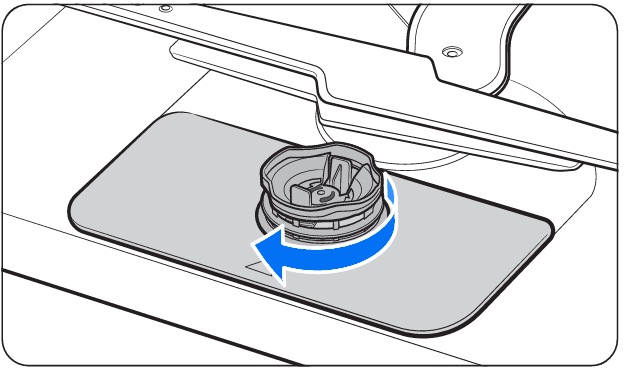
Credit: www.samsung.com
Frequently Asked Questions
How Do I Clean The Filter On My Samsung Dishwasher?
To clean your Samsung dishwasher filter, first remove the bottom rack. Twist the filter counterclockwise and lift it out. Rinse under running water to remove debris. Reinstall by aligning the filter and twisting clockwise until secure. Regular cleaning ensures efficient operation.
Always check your manual for specific instructions.
How Do I Find And Remove My Dishwasher Filter?
Locate your dishwasher’s filter at the bottom of the tub, typically beneath the spray arm. Turn it counterclockwise to remove. Clean it under running water, scrubbing away debris. Reinstall by aligning and twisting clockwise until secure. Always consult your dishwasher’s manual for specific instructions.
Where Is The Water Filter In A Samsung Dishwasher?
The water filter in a Samsung dishwasher is located at the bottom center, near the spray arm. Remove the lower rack to access it. Regular cleaning ensures optimal performance and prevents blockages. Always consult your dishwasher manual for specific instructions regarding filter maintenance and replacement.
How To Pull Out A Samsung Washer Filter?
Locate the filter at the front bottom of the washer. Open the cover, turn the filter counterclockwise, and pull it out gently. Clean the filter under running water before re-inserting it securely. Always refer to the user manual for specific instructions related to your model.
Conclusion
Cleaning your Samsung dishwasher filter is easy. A clean filter keeps your dishes spotless. Regular maintenance prevents clogs and saves money on repairs. Remember these steps: open, remove, rinse, and replace the filter. Your dishwasher works best when the filter is clean.
Check your filter monthly for debris. Follow these tips, and your dishwasher will run efficiently. Enjoy cleaner dishes with less hassle. Keep your kitchen running smoothly with these simple steps. A clean filter means better performance. Your Samsung dishwasher deserves the best care.
Make filter cleaning a regular habit for optimal results.
