

Is your Whirlpool dishwasher acting up and leaving you with a pile of dirty dishes? Don’t worry; you’re not alone.
Sometimes, all it takes is a simple reset to get things back on track. But how exactly do you reset a Whirlpool dishwasher? You’ve come to the right place to find out. Imagine the relief of hearing that gentle hum as your dishwasher springs back to life, ready to tackle your kitchen chaos once more.
You’ll discover the straightforward steps to reset your Whirlpool dishwasher, empowering you to reclaim your kitchen and restore peace of mind. Stay with us, and you’ll have your dishwasher running smoothly in no time.

Credit: www.youtube.com
Reasons For Resetting
Resetting a Whirlpool dishwasher helps solve many common problems. It can address technical glitches and restore normal functions. Understanding why you might reset the dishwasher is essential.
Common Issues Requiring A Reset
Whirlpool dishwashers sometimes face minor errors. These include software glitches or power interruptions. Such issues might cause the dishwasher to stop mid-cycle. Water might not drain properly. Buttons might become unresponsive. Resetting can often fix these problems quickly.
Signs Your Dishwasher Needs A Reset
Is your dishwasher displaying error codes? This might indicate a need for a reset. A cycle taking longer than usual can signal a problem. Unusual noises during operation can also be a sign. If the dishwasher doesn’t start, a reset might help.
Credit: www.partstown.com
Preparation Steps
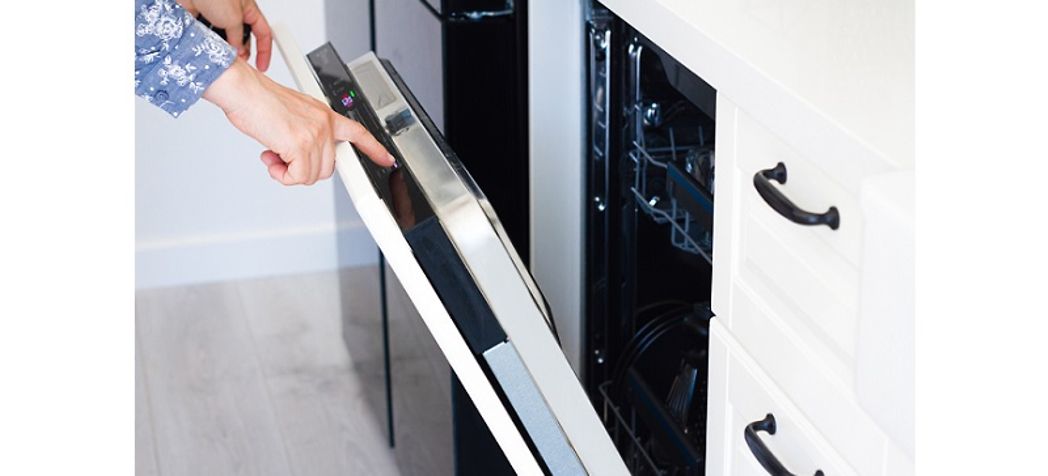
Begin by locating your dishwasher’s reset button, usually found on the control panel. Press and hold it for about three seconds. This action should reset the dishwasher, returning it to its default settings.
Resetting a Whirlpool dishwasher might seem daunting, but with the right preparation, it becomes a breeze. Before you dive into the technical steps, it’s crucial to prepare adequately. By taking the time to set up properly, you ensure the process is smooth and safe. Let’s break down the preparation steps to help you get started.Safety Precautions
Your safety should always come first. Begin by unplugging the dishwasher from the power outlet. This prevents any risk of electric shock. Next, make sure your hands are dry. Wet hands can be a hazard when dealing with electrical appliances. If your dishwasher is hardwired, turn off the circuit breaker. Ensure that no one accidentally turns it back on while you’re working.Tools Required
Gathering the right tools before you start can save you a lot of time and hassle. You’ll need a basic screwdriver to access some components of the dishwasher. A flashlight can be handy to see into the darker areas of the appliance. Having a notepad or your phone ready to jot down notes or take pictures can be helpful. This way, you can easily remember how everything is connected. Preparation is key to successfully resetting your dishwasher. Have you ever found yourself mid-task, missing a crucial tool? Avoid that frustration by ensuring you have everything ready before you start. Remember, the goal is to make the reset process as seamless as possible, allowing your Whirlpool dishwasher to function optimally once again.Step-by-step Reset Process
Resetting a Whirlpool dishwasher can solve many common issues. This process helps clear errors or unresponsive behavior. Follow these simple steps to reset your dishwasher. Each method provides a different approach based on your dishwasher’s needs.
Manual Reset Instructions
Begin by opening the dishwasher door. Locate the “Cancel” or “Drain” button on the control panel. Press it twice within a few seconds. This action cancels the current cycle. Wait for the machine to drain. Close the door securely. Your dishwasher should be reset and ready to use.
Control Panel Reset Method
Find the “Start/Reset” button on the control panel. Press and hold it for three seconds. This resets the control panel settings. The dishwasher may beep or flash lights. Release the button and wait. The machine should clear any errors. Your dishwasher is now reset.
Power Cycle Method
Turn off the dishwasher using the power button. Unplug the appliance from the power outlet. Wait for at least five minutes. Plug the dishwasher back in. Turn the power button on. This power cycle refreshes the system. Your dishwasher is ready for a new cycle.
Troubleshooting Tips
Resetting a Whirlpool dishwasher can resolve minor glitches. First, unplug the appliance for at least one minute. Then, plug it back in and select a new cycle. This simple reset often helps restore normal function.
Resetting a Whirlpool dishwasher can seem like a daunting task when it’s not working as expected. But before you consider calling a professional, there are some troubleshooting tips you can try. These strategies are straightforward and can save you both time and money.What To Do If Reset Fails
If your Whirlpool dishwasher doesn’t reset after following the standard procedure, don’t panic. First, ensure that you have followed the steps accurately: unplug the dishwasher, wait for a few minutes, and then plug it back in. Sometimes, a simple oversight, like not waiting long enough, can make all the difference. If that doesn’t work, check your home’s circuit breaker. Dishwashers require a lot of power, and a tripped breaker could be the culprit. Resetting the breaker might just get your appliance back in action. Another step is to inspect the control panel for any error codes. These codes can provide clues about what might be wrong. You can refer to the user manual for details on what each code means.Identifying Persistent Issues
When your dishwasher continues to act up, it might be time to look deeper into the problem. Persistent issues often point to underlying problems that need attention. Consider the possibility of a faulty door latch. If the door doesn’t close properly, the dishwasher won’t start. Ensure the door is securely latched and free of obstructions. Check the water supply line. A kinked or damaged hose can prevent water from entering the dishwasher, causing it to malfunction. Straighten the hose or replace it if necessary. Another common issue is a clogged drain. Food particles and debris can block the drain, affecting the dishwasher’s performance. Clean the drain filter and remove any visible debris. If these steps don’t resolve the issue, it might be time to consult a professional. But before doing so, ask yourself: Have you explored every possibility? Sometimes, a fresh perspective can uncover a simple solution you might have missed. Remember, taking the time to troubleshoot can often save you the hassle and cost of unnecessary repairs.Maintenance Advice
Maintaining your Whirlpool dishwasher is crucial for its longevity and performance. Regular maintenance can prevent common issues and save you money on repairs. Just like any other appliance, a little care goes a long way. Imagine the peace of mind knowing your dishwasher is running efficiently without unexpected hiccups. So, how can you ensure your dishwasher stays in top shape?
Regular Cleaning Tips
Keeping your dishwasher clean is the first step to effective maintenance. You might think the dishwasher cleans itself, but residues can build up over time. Start by checking the filter regularly. Remove it, rinse it under warm water, and scrub gently if needed.
Don’t forget the spray arms. They can be clogged with food particles. Remove them and clean with a soft brush. Also, wipe the door seals with a damp cloth to prevent mold and mildew.
- Use a dishwasher cleaner monthly for thorough internal cleaning.
- Run hot water in the sink before starting a cycle to ensure optimal temperature.
Preventive Measures
Preventive measures can help avoid the need for a reset or repair. Are you using the right detergent? Powder detergents can leave less residue than liquid ones. Check your water hardness and adjust detergent use accordingly.
Consider running your dishwasher when it’s full to avoid wasting energy. This also prevents the overuse of components, reducing wear and tear. Watch out for overloading, though, as it can block the spray arms.
Inspect hoses and connections periodically for leaks. A quick check can save you from bigger issues down the line. Wouldn’t it be nice to catch a problem before it becomes a major inconvenience?
By taking these simple steps, you can maintain your Whirlpool dishwasher effectively. It’s about consistency and care. Your dishwasher will thank you by running smoothly and efficiently for years to come.
When To Seek Professional Help
Consider calling a technician if your Whirlpool dishwasher doesn’t reset after following basic troubleshooting steps. Unusual noises or persistent error codes also signal a need for expert assistance. Professional help ensures your appliance functions smoothly without causing further issues.
Resetting a Whirlpool dishwasher can often be a straightforward process. However, there are times when the complexity of the issue or concerns about the warranty might lead you to seek professional help. Understanding when to call in an expert can save you time, money, and further headaches.Complex Issues
Sometimes, your dishwasher might exhibit problems that aren’t solved by a simple reset. If your dishwasher is leaking, making unusual noises, or not draining properly, these might be signs of more complex mechanical or electrical issues. Attempting to fix these problems without the proper knowledge can lead to further damage. You could end up voiding warranties or creating hazards like electrical shorts. Professional technicians have the training and tools to address these issues safely and effectively. You might think you’re saving money by trying to fix it yourself, but a professional can often diagnose and resolve the issue more efficiently.Warranty Considerations
Before you grab a screwdriver, consider your dishwasher’s warranty. Many dishwashers come with warranties that cover specific repairs or replacements. Tampering with the appliance on your own could void this warranty. Check the terms of your warranty before attempting any repairs. If your dishwasher is still under warranty, it’s often best to contact the manufacturer or an authorized service provider. They can offer solutions that won’t affect your coverage. Think about it: is the risk of voiding a warranty worth the potential savings of a DIY repair? A professional service call might be a small price to pay for peace of mind and a functioning appliance. In the end, knowing when to seek professional help with your Whirlpool dishwasher can be as important as understanding how to reset it. Wouldn’t you rather avoid unnecessary stress and ensure your appliance is in good hands?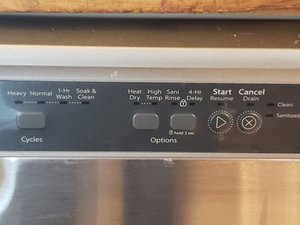
Credit: www.ifixit.com
Frequently Asked Questions
How Do I Reset A Whirlpool Control Panel?
To reset a Whirlpool control panel, unplug the appliance for one minute. Plug it back in. Press any button to clear error codes. The control panel should reset. If issues persist, consult your manual or contact Whirlpool support.
How Do You Force A Dishwasher To Reset?
To reset a dishwasher, unplug it or turn off the circuit breaker. Wait 1-2 minutes, then reconnect. Consult the manual for specific models. This process should help resolve minor glitches and restore normal operation.
How Do I Force My Whirlpool Washer To Reset?
Unplug the washer for one minute. Plug it back in. Select a new cycle and press the start button. This resets the Whirlpool washer effectively.
What Is The Most Common Problem With A Whirlpool Dishwasher?
The most common problem with Whirlpool dishwashers is drainage issues. Clogged filters or hoses often cause water not to drain. Regular maintenance and cleaning can prevent this issue, ensuring efficient operation. Check for blockages or kinks in hoses to resolve drainage problems swiftly and maintain optimal performance.
Conclusion
Resetting your Whirlpool dishwasher is simple. Follow the steps we shared. First, check your manual for model specifics. Then, unplug the dishwasher for safety. Press the reset button if available. If not, use the control panel. Hold the start button for a few seconds.
Listen for beeps or lights indicating a reset. Turn it back on and test a cycle. This process solves many minor issues. Always consult a professional for persistent problems. Your dishwasher should now work smoothly. Enjoy clean dishes without hassle.
Regular maintenance helps avoid future resets. Keep instructions handy for easy reference.
